Remote Desktop Access
After ordering a VPS from your Hosting Provider, you should obtain an IP address (or a hostname), a username and a password to connect to your VPS server.
Once you have this information, follow the instructions on this page to access your VPS remotely.
Create a desktop shortcut to easily connect to your VPS
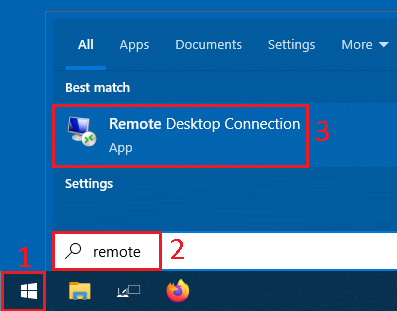
- From the
Windows Startup Menu - Type or search for
Remote Desktop - Click on the
Remote Desktop Connectionto launch the program
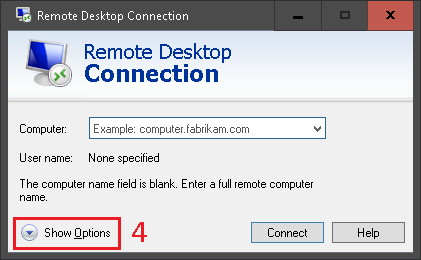
- In the new window, click on
Show Options
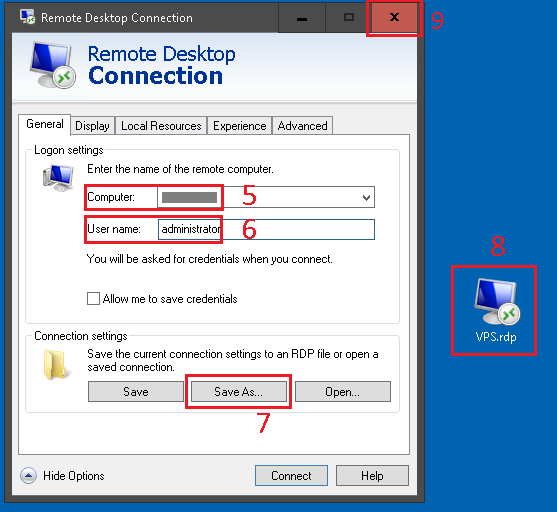
- Type the IP Address or Hostname in
Computer - Type the user name in
User name - Click
Save As... - And browse to the
Desktopto create a shortcut there - And close this window
Use the desktop shortcut to connect to your VPS
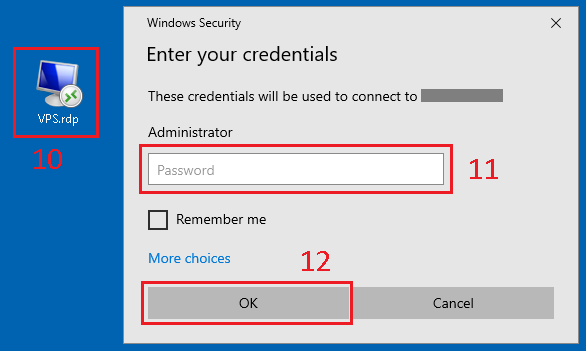
- From the
Desktop, open theRemote Desktopshortcut - Type the password
- And click
OKto connect