Disable password expiration
By default on Windows Server, the user password usually expires after couple of weeks.
If this happen, you might struggle to connect to your VPS using the Remote Desktop.
Follow the instructions below to disable the password expiration for your user.

- Use the
WindowsKey+Rkeys to open theRunwindow, or search forRunin theStart Menu - The
Runwindow should open - In the
Openfield, typecompmgmt.msc - Click
OKto confirm
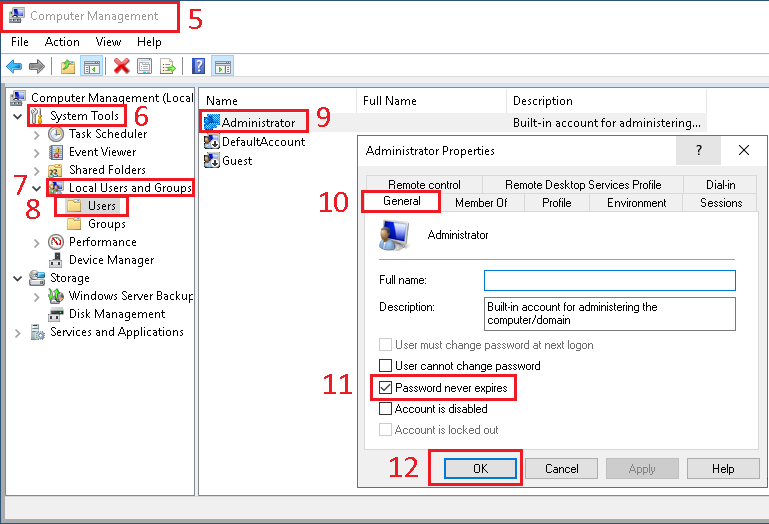
- The
Computer Managementwindow should open - On the left side of the window, select and unfold
System Tools - Then select and unfold
Local Users and Groups - Then select and unfold
Users - In the right part of the window, right click on your username (probably
Administrator) and selectProperties - In the
Administrator Propertieswindow, select theGeneraltab - In the
Generaltab, checkPassword never expires - Click
OKto confirm