Create the "Trading Files" folder on the Desktop
In order to keep things in order, I suggest you create a folder called Trading Files on the Desktop.
We will store all the files we download into this folder.
The Trading Files folder will have the following folder structure.
C:\
└── Users
    └── <Your Username>
        └── Desktop
            └── Trading Files
                ├─ Executables  # Contains the executables for the programs
                ├─ Installers   # Contains scripts to automatically install programs
                ├─ MQL5         # Parent folder for MetaTrader5 files
                │   ├─ Experts      # Contains the Expert Advisors files (extension: .ex5)
                │   ├─ Indicators   # Contains the Indicators files (extension: .ex5)
                │   ├─ Scripts      # Contains the Scripts files (extension: .ex5)
                │   └─ Profiles
                │       └─ Templates # Contains Chart Templates files (extension: .tpl)
                ├─ Set files    # Contains the Setting files for the Expert Advisor (extension: .set)
                └─ Tools        # Contains some Tools and other small programs
Automatically create the "Trading Files" folder structure
You can download and execute this script (do right click and save as ...) to create the Trading Files folder structure automatically on the desktop.
Manually create the "Trading Files" folder structure
If you don't want to use the script above, you can create the folder structure manually, as shown below.
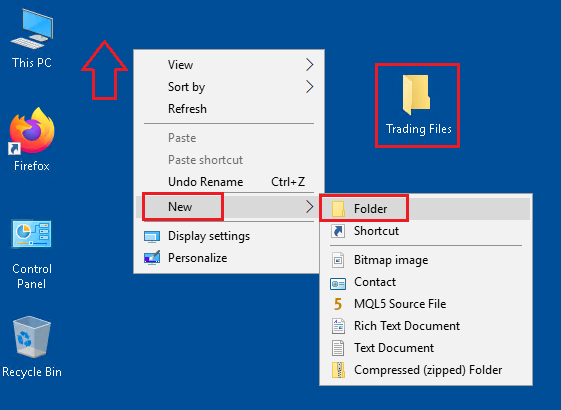
- Do a
right clickon the Desktop - Select
New - Select
Folder - Name the new folder
Trading Files - Open the
Trading Filesfolder - Repeat the folder creation process with all the other folders