7-Zip
7-Zip is a tool that allows to decompress files. It's not mandatory to install it, but you can do it by following the instructions below.
Installation
Automatic installation (using the installer script)
- On the Desktop, open the
Trading Filesfolder - Then open the
Installersfolder - Then open the
7Zipfolder - Launch the
Install-7Zip.cmdscript - Wait for the black window to finish
Manual installation
1. Obtain install files
- Open the 7-ZIP Download page and download the latest version of the
64-bit Windows x64 .exeinstaller - Save the installer in the
Trading Filesfolder, in a folder calledExecutables.
2. Install
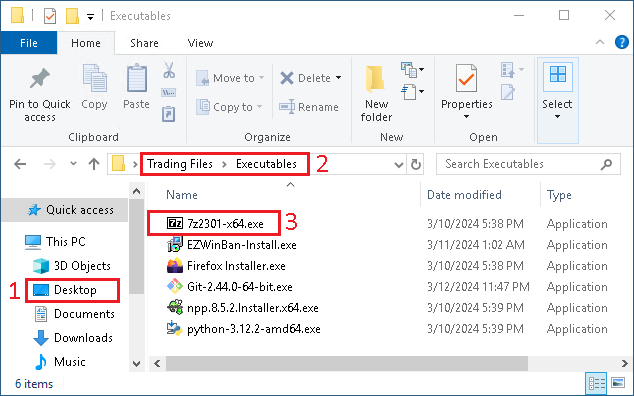
- From the
Desktop - Open the
Trading Filesfolder, thenExecutablesfolder - Launch the
7zXYZ-x64.exeinstaller

- In the new window, click on
Install

- Click on
Close