Open chart window
Once you have decided which symbol you want to trade, you have to open the chart window for that symbol.
Add symbol to Market Watch
If the symbol is not visible in the Market Watch window, you will have to add it.
Depending on the broker and account type, the symbol names might have a special extension.
The account on the screenshot is a PUPrime PrimeCent account, so the symbol extension is .pc.

- Locate the
Market Watchwindow. If it's not visible, you can enable it by clicking on theViewmenu, then selectingMarket Watch - If the symbol you want to trade is missing, click on
+ click to addand type the name of the symbol you are looking for
Open chart window
Once the symbol you want to use is available in the Market Watch, you can open a chart by following the instructions below.
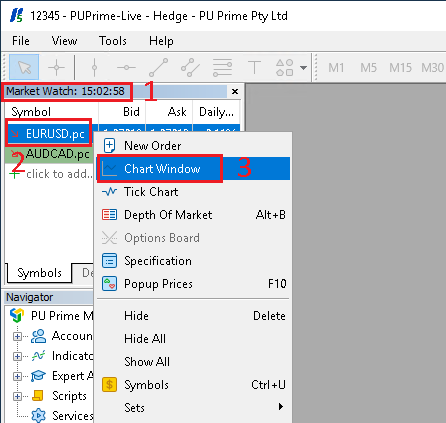
- From the
Market Watchwindow - Do a
right clickon the symbol you want to use - In the menu that opens, click on
Chart Window