Indicators
An Indicator is a program that you attach on a chart the same way as an Expert Advisor, but the Indicator cannot make any trades. It is mostly used to add visual informations on the chart, or to do some automated tasks every now and then.
By default, the Expert Advisors will automatically load the Indicators it need to run correctly.
But you can always add couple of extra Indicators for you, so you can see things more clearly.
The Indicators that you add to a chart window are only added for you. The Expert Advisor will not be using those indicators.
Load an indicator
Follow the instructions below if you want to add some Indicators for you.
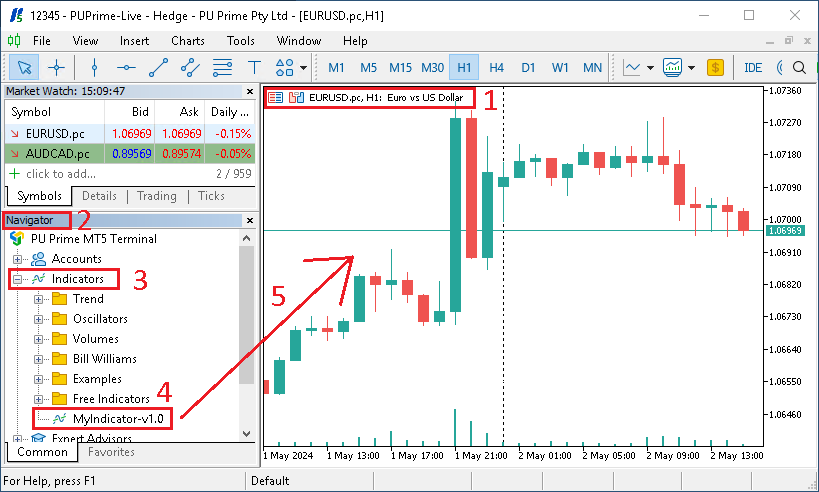
- Make sure you have open the right chart window
- From the
Navigatorwindow - Browse to
Indicators - Select the
Indicatoryou want to use - Drag and drop it onto the chart window

- If a new window open, you might be able to change the
Indicatorssettings - Click on the
Inputstab - You can change the variables values
- Or you can
ImportandExportthe settings - Once you are done editing the settings, click on
OK
Edit the settings of an indicator
If you already have an Indicator running on a chart, you can change its settings by following the instructions below.
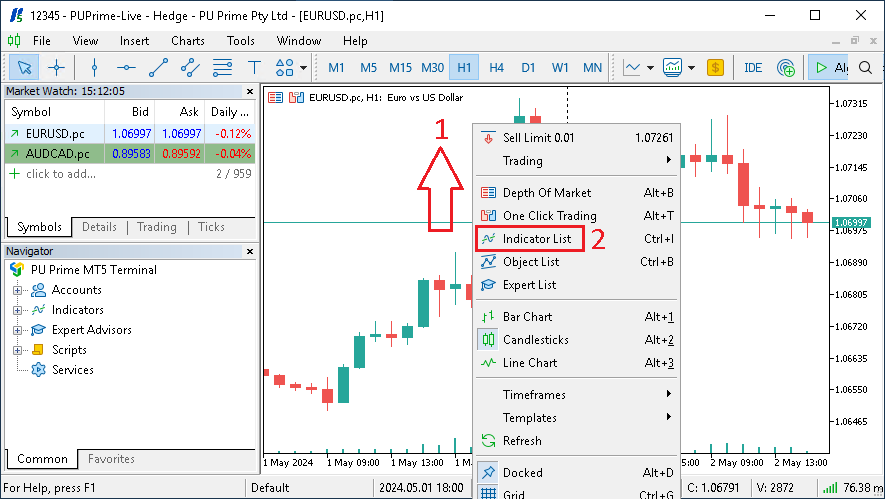
- Do a
right clickon the chart - Select
Indicators List - In the new window, find the name of the indicator you want to edit, and click on
Properties

- In the new window, click on
Inputs - You can change the variables values
- Or you can
ImportandExportthe settings - Once you are done editing the settings, click on
OK