Download MetaTrader for your broker
Download the right version of MetaTrader for the right broker
It is suggested to use the MetaTrader installation file from the broker you plan to use, instead of using a different broker's installation file.
From the broker's site
You can download the MetaTrader5 installer file directly from the Broker's website.
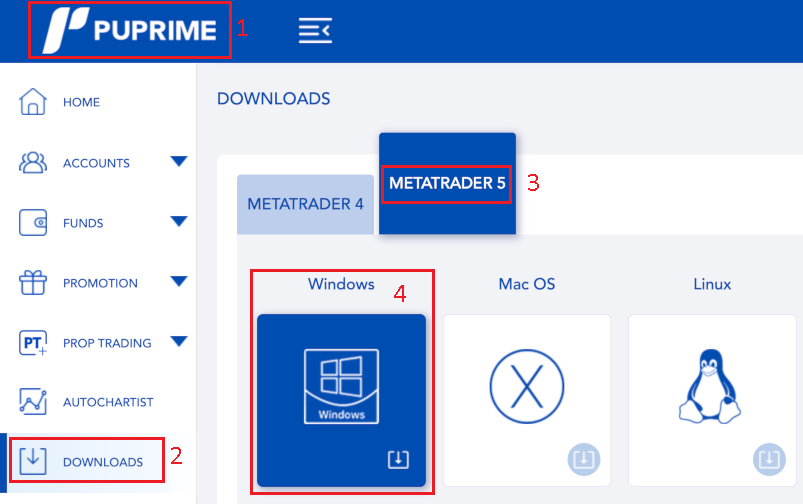
- In the case of
PUPrime - Click
Downloads - Then click on
MetaTrader 5 - Then click on
Windowsto download the file directly, or do right click and selectCopy linkto copy the download link, in case you want to save it for later - Save this
MetaTrader5installer in theDownloadsfolder of your VPS
Using the direct links
You can find below the direct links to the MetaTrader5 installer for the Brokers I'm using.
- PUPrime: https://download.mql5.com/cdn/web/pu.prime.pty/mt5/puprime5setup.exe
- FusionMarkets: https://download.mql5.com/cdn/web/fusion.markets.pty/mt5/fusionmarkets5setup.exe
- MonetaMarkets: https://download.mql5.com/cdn/web/moneta.markets.south/mt5/monetamarkets5setup.exe
- VantageMarkets: https://download.mql5.com/cdn/web/14111/mt5/vantageinternational5setup.exe
Save this MetaTrader5 installer in the Downloads folder of your VPS.