Copy MetaTrader5 Shortcut Folders to the Desktop
When you install MetaTrader, it creates a folder in the Start Menu, which contains multiple shortcut to launch the program.
To simplify the launch of MetaTrader, we will copy this folder from the Start Menu onto the Desktop.
We will also use this folder on the Desktop to store files related to this MetaTrader installation, like the Expert Advisor's configuration file to use for this specific MetaTrader5 Account.
The end-goal is to have as many MetaTrader folders on the Desktop as we have MetaTrader installed (see example below).

Copy the folder
Important: Make a COPY, do not CUT, as we want to keep the shortcut folder in the Startup Menu too.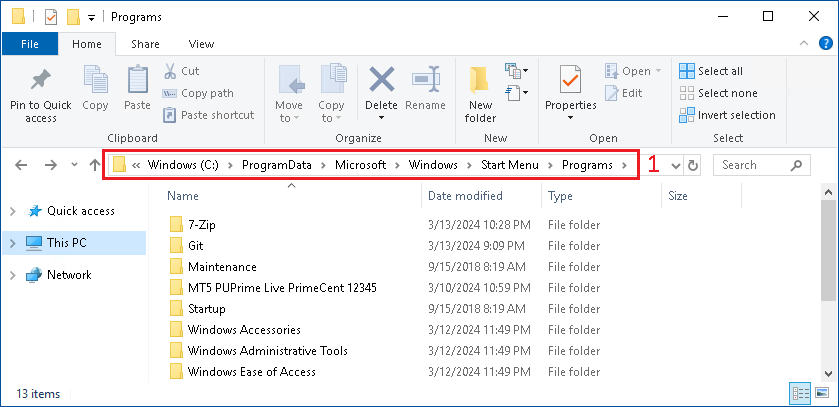
- Go in the folder
C:\ProgramData\Microsoft\Windows\Start Menu\Programs
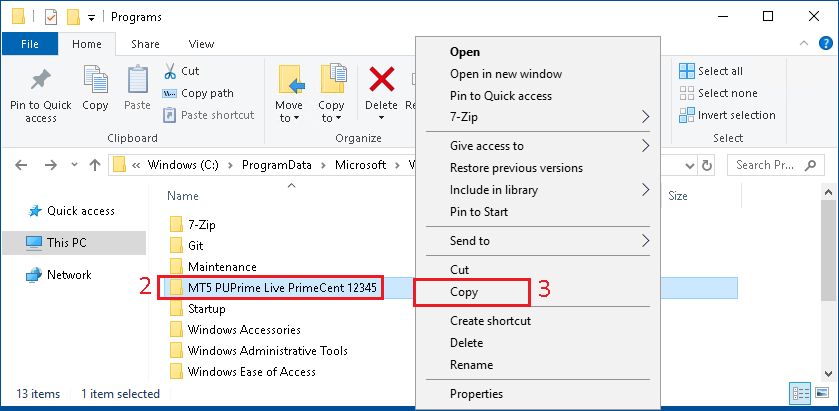
- Find the folder that has been created, matching the
BrokerandAccount Number - Do
right clickon this folder, andCopy
- On the
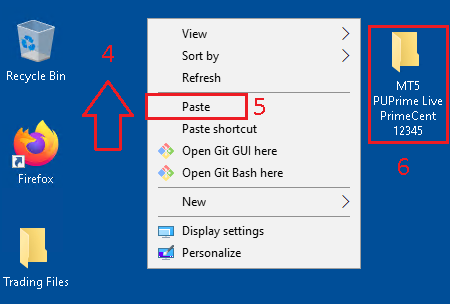
Desktop, doRight Clickto open the menu - In the right click menu, click on
Paste. - A copy of the folder will appear on the
Desktop. This folder contains the shortcut to launchMetaTrader5for this specific account.
- On the
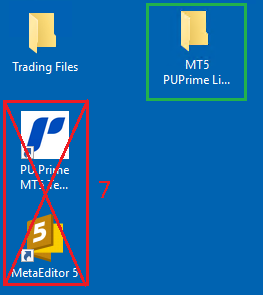
Desktop, find the two shortcut that have been created forMetaTraderandMetaEditorand delete them, as they would anyway be overwritten during the next install ofMetaTrader