Set a Chart template as default
This page will help you saving a chart template as default template, so it becomes in use for every new window that you open.
It's important to understand that if you have an Expert Advisor loaded on a chart, if you export the chart template, it will also contains this Expert Advisor.
This means that when you will open a new window it will automatically load the Expert Advisor, which is very likely not something you want to do.
In order to avoid that, remember to always use an empty chart window to export the template from.
You can for example open the Chart window of a symbol that you never use, that way there will not be any Expert Advisor loaded on this chart.
Export the Chart template as default

- Click on the
Chartsmenu - Select
Templates - Then select
Save Template
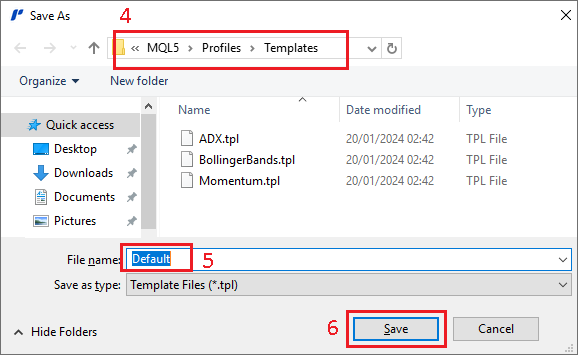
- In the
Save Aswindow, make sure you are in the folderMQL5\Profiles\Templates - Name the file
Default.tpl - Click on
Saveto save this file as default template